本篇文章简单介绍如何使用cursor来开发一个flutter桌面端的项目,也可以使用其他的编辑器如windsurf、trae等,其他的项目如web端开发、app端开发等也同理。
因为工作中,经常需要一些特定的python脚本来处理各种问题,苦于使用命令行的繁琐和不能集中管理,遂开发这样一个脚本管理器来方便管理和快速运行。
生成原型图 首先使用claude3.7 thinking模型生成我们项目的原型图,提示词根据自己的项目进行调整,在生成之后可以继续提出要求进行调整:
1
2
3
4
5
6
7
8
9
10
11
12
13
14
15
16
17
我想开发一个脚本管理器的Flutter桌面客户端,需要满足的基本功能是: 1、左侧为脚本列表,每个条目显示标题和小标题,标题显示文件名,小标题淡色+小字体显示文件路径 2、右侧为脚本内容,支持代码高亮和行号,有一个运行按钮 3、支持添加脚本 4、支持脚本分类 现在需要输出高保真的原型图,请通过以下方式帮我完成所有界面的原型设计: 1、用户体验分析:先分析这个桌面客户端的主要功能和用户需求,确定核心交互逻辑。 2、产品界面规划:作为产品经理,定义关键界面,确保信息架构合理。 3、高保真 UI 设计:作为 UI 设计师,设计贴近现代桌面应用设计规范的界面,使用符合 Flutter 设计语言的 UI 元素,使其具有良好的视觉体验。 4、HTML 原型实现:使用 HTML + Tailwind CSS(或 Bootstrap)生成所有原型界面,并使用 FontAwesome(或其他开源 UI 组件)让界面更加精美、接近真实的桌面应用设计。 5、每个界面应作为独立的 HTML 文件存放,例如 main.html、settings.html、editor.html 等。 6、index.html 作为主入口,不直接写入所有界面的 HTML 代码,而是使用 iframe 的方式嵌入这些 HTML 片段,并将所有页面直接平铺展示在 index 页面中,而不是跳转链接。 7、使用符合桌面应用风格的 UI 元素,而非移动端占位符(可从 Flutter 官方 UI 资源或现代桌面应用中获取灵感)。 8、真实感增强:界面尺寸应模拟标准桌面应用窗口(如1280x800像素),并添加窗口控制按钮(最小化、最大化、关闭),使其更像真实的桌面应用界面。 请按照以上要求生成完整的 HTML 代码,并确保其可用于实际开发。
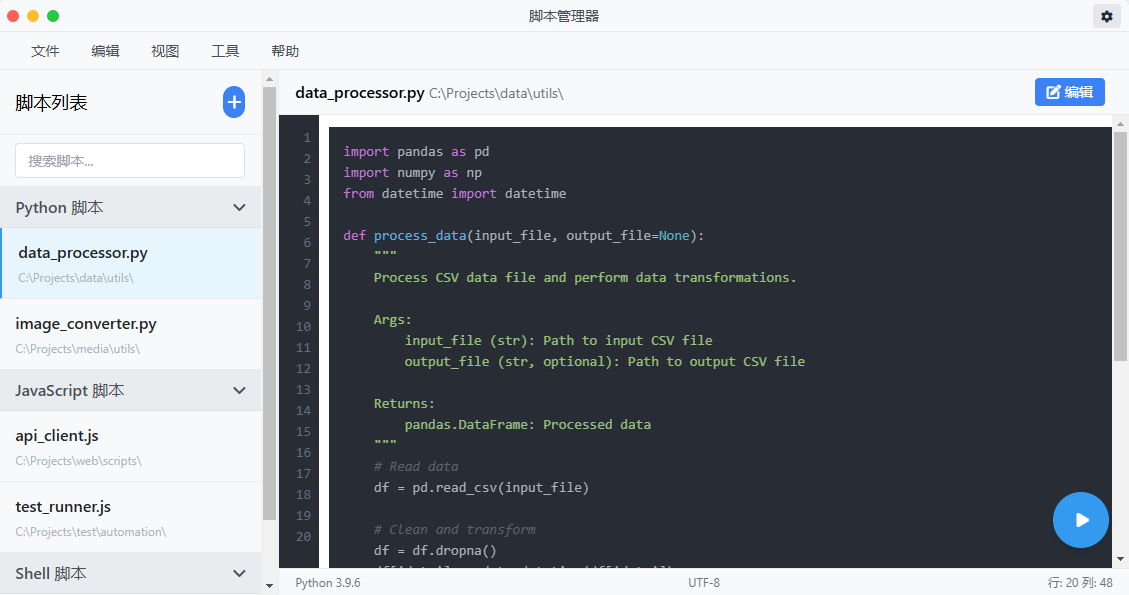
这里,它给我们的生成的主界面是这样的:
项目开发 创建项目
首先确保已经搭建好flutter开发环境
在cursor中搜索安装flutter插件
按Ctrl+Shift+P打开命令框,输入flutter,创建一个新项目
.cursorrules Cursor Rules 是用户自定义的一组指导说明,用于帮助AI更好地理解和处理项目代码库。通过这些规则,你可以指定代码风格、技术栈、项目规范等内容,从而让AI生成更符合需求的代码。
这里我们需要一个Flutter开发专家的提示词,在项目根目录下新建一个.cursorrules文件,输入内容如下,(更多规则请参考:https://github.com/PatrickJS/awesome-cursorrules):
1
2
3
4
5
6
7
8
9
10
11
12
13
14
15
16
17
18
19
20
21
22
23
24
25
26
27
28
29
30
31
32
33
34
35
36
37
38
39
40
41
42
43
44
45
46
47
48
49
50
51
52
53
54
55
56
57
58
59
60
61
62
63
64
65
66
67
68
69
70
71
72
73
74
75
76
77
78
79
80
81
82
83
84
85
86
87
88
89
90
91
92
93
94
95
96
97
98
99
100
101
102
103
104
105
106
// Flutter App Expert .cursorrules // Flexibility Notice // Note: This is a recommended project structure, but be flexible and adapt to existing project structures. // Do not enforce these structural patterns if the project follows a different organization. // Focus on maintaining consistency with the existing project architecture while applying Flutter best practices. // Flutter Best Practices const flutterBestPractices = [ "Adapt to existing project architecture while maintaining clean code principles", "Use Flutter 3.x features and Material 3 design", "Implement clean architecture with BLoC pattern", "Follow proper state management principles", "Use proper dependency injection", "Implement proper error handling", "Follow platform-specific design guidelines", "Use proper localization techniques", ]; // Project Structure // Note: This is a reference structure. Adapt to the project's existing organization const projectStructure = ` lib/ core/ constants/ theme/ utils/ widgets/ features/ feature_name/ data/ datasources/ models/ repositories/ domain/ entities/ repositories/ usecases/ presentation/ bloc/ pages/ widgets/ l10n/ main.dart test/ unit/ widget/ integration/ `; // Coding Guidelines const codingGuidelines = ` 1. Use proper null safety practices 2. Implement proper error handling with Either type 3. Follow proper naming conventions 4. Use proper widget composition 5. Implement proper routing using GoRouter 6. Use proper form validation 7. Follow proper state management with BLoC 8. Implement proper dependency injection using GetIt 9. Use proper asset management 10. Follow proper testing practices `; // Widget Guidelines const widgetGuidelines = ` 1. Keep widgets small and focused 2. Use const constructors when possible 3. Implement proper widget keys 4. Follow proper layout principles 5. Use proper widget lifecycle methods 6. Implement proper error boundaries 7. Use proper performance optimization techniques 8. Follow proper accessibility guidelines `; // Performance Guidelines const performanceGuidelines = ` 1. Use proper image caching 2. Implement proper list view optimization 3. Use proper build methods optimization 4. Follow proper state management patterns 5. Implement proper memory management 6. Use proper platform channels when needed 7. Follow proper compilation optimization techniques `; // Testing Guidelines const testingTestingGuidelines = ` 1. Write unit tests for business logic 2. Implement widget tests for UI components 3. Use integration tests for feature testing 4. Implement proper mocking strategies 5. Use proper test coverage tools 6. Follow proper test naming conventions 7. Implement proper CI/CD testing `;
代码开发 假如我们将原型图放入了docs文件夹中,我们直接在cursor的agent模式中让它基于原型图开始开发即可,后面就是不断提出修改意见进行调整的过程。
1
2
3
4
5
6
7
我想开发一个脚本管理器的Flutter桌面客户端,需要满足的基本功能是: 1、左侧为脚本列表,每个条目显示标题和小标题,标题显示文件名,小标题淡色+小字体显示文件路径 2、右侧为脚本内容,支持代码高亮和行号,有一个运行按钮 3、支持添加脚本 4、支持脚本分类 请基于docs文件夹中的原型图开始开发。
注意点:
每次构建出一个能运行的版本后,使用git提交一次代码,便于在生成不可用的代码后及时回滚
开发过程中告诉AI,直接使用flutter run -d windows命令运行并观察控制台输出,这样AI可以直接读取控制台的报错日志进行修改。
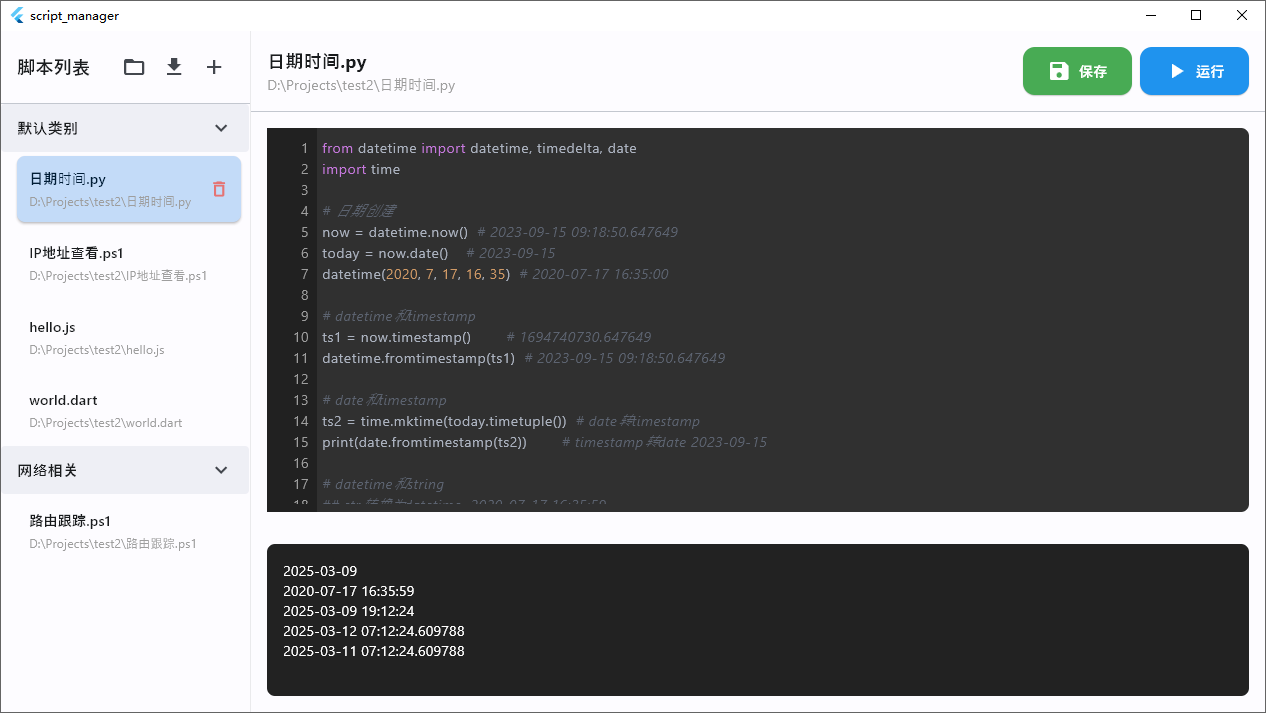
实际开发完成效果图:
支持了4中语言类型:python、powershell、javascript、dart
支持添加脚本、添加脚本分类功能
支持批量导入脚本文件功能
支持运行脚本功能
总结 目前,cursor等AI编辑器产品,已经能在无需人工编码的情况下生成一个合格的产品,只要有合适的需求和创意,我们可以利用这些工具进行快速开发。
如果你对这个脚本管理器感兴趣,可以在公众号后台回复『脚本管理器』获取。