Python Flet教程(三):实现数据持久化
Cheng
2024-12-07 13:04:17
Categories:
flet
Tags:
GUI
1.开篇陈述 在前两篇教程中,我们搭建了笔记应用的界面并实现了核心功能。但是目前所有笔记数据都存储在内存中,应用关闭后数据就会丢失。在这篇教程中,我们将:
使用SQLite实现数据持久化
添加数据库操作的错误处理
实现自动保存功能
优化数据读写性能
2.项目结构 1 2 3 4 5 6 7 8 9 noter/ │ ├── main.py ├── note.py ├── database.py ├── schema.sql ├── requirements.txt └── assets/ └── icon.png
3.代码分步讲解 3.1 数据库结构(schema.sql) 1 2 3 4 5 6 7 8 9 10 11 12 -- 创建笔记表 CREATE TABLE IF NOT EXISTS notes ( id TEXT PRIMARY KEY, -- 使用UUID作为主键 title TEXT NOT NULL, -- 笔记标题不能为空 content TEXT, -- 笔记内容可以为空 created_at TIMESTAMP NOT NULL, -- 创建时间 updated_at TIMESTAMP NOT NULL -- 更新时间 ); -- 创建索引以优化按更新时间排序的查询 CREATE INDEX IF NOT EXISTS idx_notes_updated ON notes(updated_at DESC);
设计说明:
使用TEXT类型存储UUID,而不是INTEGER自增主键,原因是:
支持分布式系统的未来扩展
避免数据迁移时的主键冲突
与Note类的设计保持一致
添加updated_at索引的原因:
笔记列表默认按更新时间排序
频繁使用updated_at进行排序
索引可以显著提高查询性能
3.2 数据库操作类(database.py) 数据库初始化和连接管理 1 2 3 4 5 6 7 8 9 10 11 12 13 14 15 16 17 18 19 20 21 22 23 24 25 26 27 28 29 30 31 32 33 34 35 36 37 38 39 40 41 42 43 44 45 46 import sqlite3from datetime import datetimefrom typing import List , Optional from note import Noteimport osclass Database : def __init__ (self, db_path: str ): """ 初始化数据库管理类 Args: db_path: 数据库文件路径 """ self .db_path = db_path self .init_db() def init_db (self ): """ 初始化数据库: 1. 创建数据库目录(如果不存在) 2. 创建数据库表和索引 3. 处理可能的数据库错误 """ try : os.makedirs(os.path.dirname(self .db_path), exist_ok=True ) with sqlite3.connect(self .db_path) as conn: with open ('schema.sql' , 'r' , encoding='utf-8' ) as f: conn.executescript(f.read()) except sqlite3.Error as e: print (f"数据库初始化错误: {e} " ) raise def get_connection (self ): """ 获取数据库连接 Returns: sqlite3.Connection: 数据库连接对象 """ try : return sqlite3.connect(self .db_path) except sqlite3.Error as e: print (f"数据库连接错误: {e} " ) raise
实现说明:
使用上下文管理器(with语句)自动管理连接
添加错误处理和日志记录
确保数据库目录存在
CRUD操作实现 1 2 3 4 5 6 7 8 9 10 11 12 13 14 15 16 17 18 19 20 21 22 23 24 25 26 27 28 29 30 31 32 33 34 35 36 37 38 39 40 41 42 43 44 45 46 47 48 49 50 51 52 53 54 55 56 57 58 59 60 61 62 63 64 65 66 67 68 69 70 71 72 def save_note (self, note: Note ) -> None : """ 保存或更新笔记 Args: note: 要保存的笔记对象 """ sql = ''' INSERT OR REPLACE INTO notes (id, title, content, created_at, updated_at) VALUES (?, ?, ?, ?, ?) ''' try : with self .get_connection() as conn: conn.execute(sql, ( note.id , note.title, note.content, note.created_at.isoformat(), note.updated_at.isoformat() )) except sqlite3.Error as e: print (f"保存笔记错误: {e} " ) raise def delete_note (self, note_id: str ) -> None : """ 删除笔记 Args: note_id: 要删除的笔记ID """ sql = 'DELETE FROM notes WHERE id = ?' try : with self .get_connection() as conn: conn.execute(sql, (note_id,)) except sqlite3.Error as e: print (f"删除笔记错误: {e} " ) raise def get_all_notes (self ) -> List [Note]: """ 获取所有笔记,按更新时间降序排序 Returns: List[Note]: 笔记对象列表 """ sql = 'SELECT * FROM notes ORDER BY updated_at DESC' try : with self .get_connection() as conn: cursor = conn.execute(sql) return [self ._row_to_note(row) for row in cursor.fetchall()] except sqlite3.Error as e: print (f"获取笔记列表错误: {e} " ) raise def search_notes (self, query: str ) -> List [Note]: """ 搜索笔记 Args: query: 搜索关键词 Returns: List[Note]: 匹配的笔记列表 """ sql = ''' SELECT * FROM notes WHERE title LIKE ? OR content LIKE ? ORDER BY updated_at DESC ''' try : with self .get_connection() as conn: cursor = conn.execute(sql, (f'%{query} %' , f'%{query} %' )) return [self ._row_to_note(row) for row in cursor.fetchall()] except sqlite3.Error as e: print (f"搜索笔记错误: {e} " ) raise
实现说明:
使用参数化查询防止SQL注入
统一的错误处理机制
使用事务确保数据一致性
ISO格式处理时间戳
数据转换方法 1 2 3 4 5 6 7 8 9 10 11 12 13 14 15 16 17 18 19 20 @staticmethod def _row_to_note (row ) -> Note: """ 将数据库行转换为Note对象 Args: row: 数据库查询结果行 Returns: Note: 转换后的笔记对象 """ try : return Note( id =row[0 ], title=row[1 ], content=row[2 ], created_at=datetime.fromisoformat(row[3 ]), updated_at=datetime.fromisoformat(row[4 ]) ) except (IndexError, ValueError) as e: print (f"数据转换错误: {e} " ) raise
实现说明:
使用静态方法便于复用
处理时间格式转换
添加错误处理
3.3 更新Note类(note.py) 1 2 3 4 5 6 7 8 9 10 11 12 13 14 15 16 17 18 19 20 21 22 23 24 25 26 27 28 29 30 31 32 33 34 35 36 37 38 39 40 41 42 from dataclasses import dataclassfrom datetime import datetimeimport uuid@dataclass class Note : def to_dict (self ) -> dict : """ 将Note对象转换为字典,用于序列化 Returns: dict: 包含笔记数据的字典 """ return { 'id' : self .id , 'title' : self .title, 'content' : self .content, 'created_at' : self .created_at.isoformat(), 'updated_at' : self .updated_at.isoformat() } @classmethod def from_dict (cls, data: dict ) -> "Note" : """ 从字典创建Note对象,用于反序列化 Args: data: 包含笔记数据的字典 Returns: Note: 创建的笔记对象 """ try : return cls( id =data['id' ], title=data['title' ], content=data['content' ], created_at=datetime.fromisoformat(data['created_at' ]), updated_at=datetime.fromisoformat(data['updated_at' ]) ) except (KeyError, ValueError) as e: print (f"从字典创建Note对象错误: {e} " ) raise
实现说明:
使用dataclass简化类定义
添加序列化和反序列化方法
统一的时间格式处理
完善的错误处理
3.4 更新主程序(main.py) 1 2 3 4 5 6 7 8 9 10 11 12 13 14 15 16 17 18 19 20 21 22 23 24 25 26 27 28 29 30 31 32 33 34 35 36 37 38 39 40 41 42 43 44 45 46 47 48 49 50 51 52 53 54 55 56 57 58 59 60 61 62 63 64 65 66 67 68 69 70 71 72 73 74 75 76 77 78 79 80 81 82 83 84 85 86 87 88 89 90 91 92 93 94 95 96 97 98 99 100 101 102 103 104 105 106 107 108 import flet as ftfrom note import Notefrom database import Databaseimport osclass NoterApp : def __init__ (self, page: ft.Page ): self .page = page self .setup_page() db_path = os.path.join(os.path.dirname(__file__), 'data' , 'notes.db' ) try : self .db = Database(db_path) self .notes: list [Note] = self .db.get_all_notes() except Exception as e: print (f"数据库初始化错误: {e} " ) self .page.show_snack_bar( ft.SnackBar(content=ft.Text("数据库初始化失败,请检查数据库文件" )) ) self .notes = [] self .current_note: Note = None self .setup_controls() self .render() def create_note (self, e=None ): """创建新笔记并保存到数据库""" try : note = Note.create("新建笔记" , "" ) self .notes.append(note) self .db.save_note(note) self .select_note(note) self .update_notes_list() self .title_field.focus() self .page.update() except Exception as e: print (f"创建笔记错误: {e} " ) self .page.show_snack_bar( ft.SnackBar(content=ft.Text("创建笔记失败" )) ) def delete_note (self, note: Note ): if note in self .notes: self .notes.remove(note) self .db.delete_note(note.id ) if self .current_note == note: self .current_note = None self .title_field.value = "" self .content_field.value = "" self .update_notes_list() self .page.update() def on_title_change (self, e ): if self .current_note: self .current_note.update(title=e.control.value) self .db.save_note(self .current_note) self .update_notes_list() self .page.update() def on_content_change (self, e ): """处理笔记内容变化并保存""" if self .current_note: try : self .current_note.update(content=e.control.value) self .db.save_note(self .current_note) self .update_notes_list() self .page.update() except Exception as e: print (f"保存笔记错误: {e} " ) self .page.show_snack_bar( ft.SnackBar(content=ft.Text("保存笔记失败" )) ) def search_notes (self, e ): query = e.control.value.lower() if query: self .notes = self .db.search_notes(query) else : self .notes = self .db.get_all_notes() self .update_notes_list() self .page.update() def render (self ): self .page.add( ft.Row( controls=[ self .sidebar, ft.Container( content=self .notes_list, width=300 , bgcolor=ft.colors.with_opacity(0.5 , ft.colors.BLUE_GREY_50), ), self .editor, ], expand=True , ) ) self .page.update() self .update_notes_list()
实现说明:
数据库路径使用相对路径
添加用户友好的错误提示
统一的异常处理
实时保存机制
4.性能优化说明
数据库索引
为frequently查询的字段创建索引
使用DESC排序优化最新笔记查询
连接管理
使用连接池而不是频繁创建连接
自动关闭连接避免资源泄露
查询优化
使用参数化查询
避免SELECT *(实际使用中应该只选择需要的字段)
使用LIKE查询的优化索引
错误处理
统一的异常处理机制
用户友好的错误提示
详细的错误日志
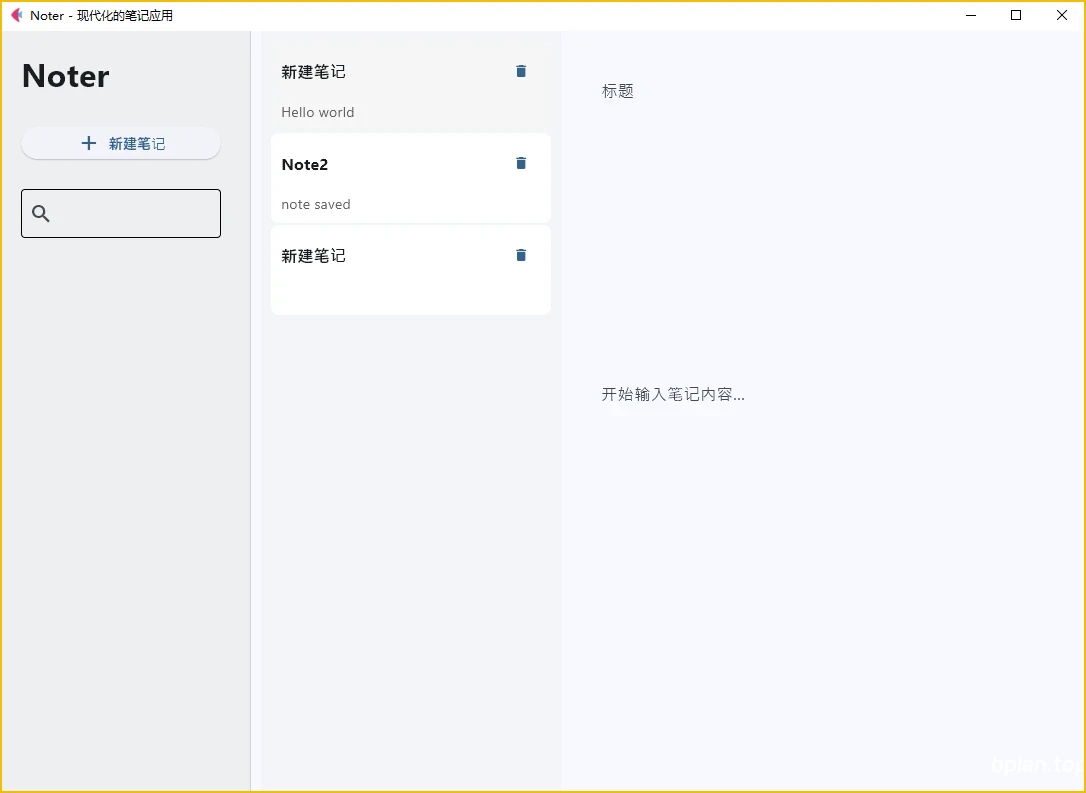
5.界面展示 如下是本篇完成后的笔记应用界面,初次打开时会加载已经保存的笔记内容:
6.本篇小结 在这一篇教程中,我们:
实现了数据持久化存储
优化了数据库操作性能
添加了错误处理机制
实现了更强大的搜索功能
确保了数据的可靠性和一致性